
A Docker-based NAS global file search tool with fuzzy filename matching, full-text content search across text files, multi-directory configuration with exclusion filters, and an Apple-style web UI.…
External links
🔍 NAS-File-Search
A Docker-based NAS global file search tool with fuzzy filename matching, full-text content search across text files, multi-directory configuration with exclusion filters, and an Apple-style web UI. Auto-generates image thumbnails, works on both desktop and mobile browsers. Ships with optional API Key auth, IP rate limiting, and path-traversal protection — safe for public deployment.
Preview
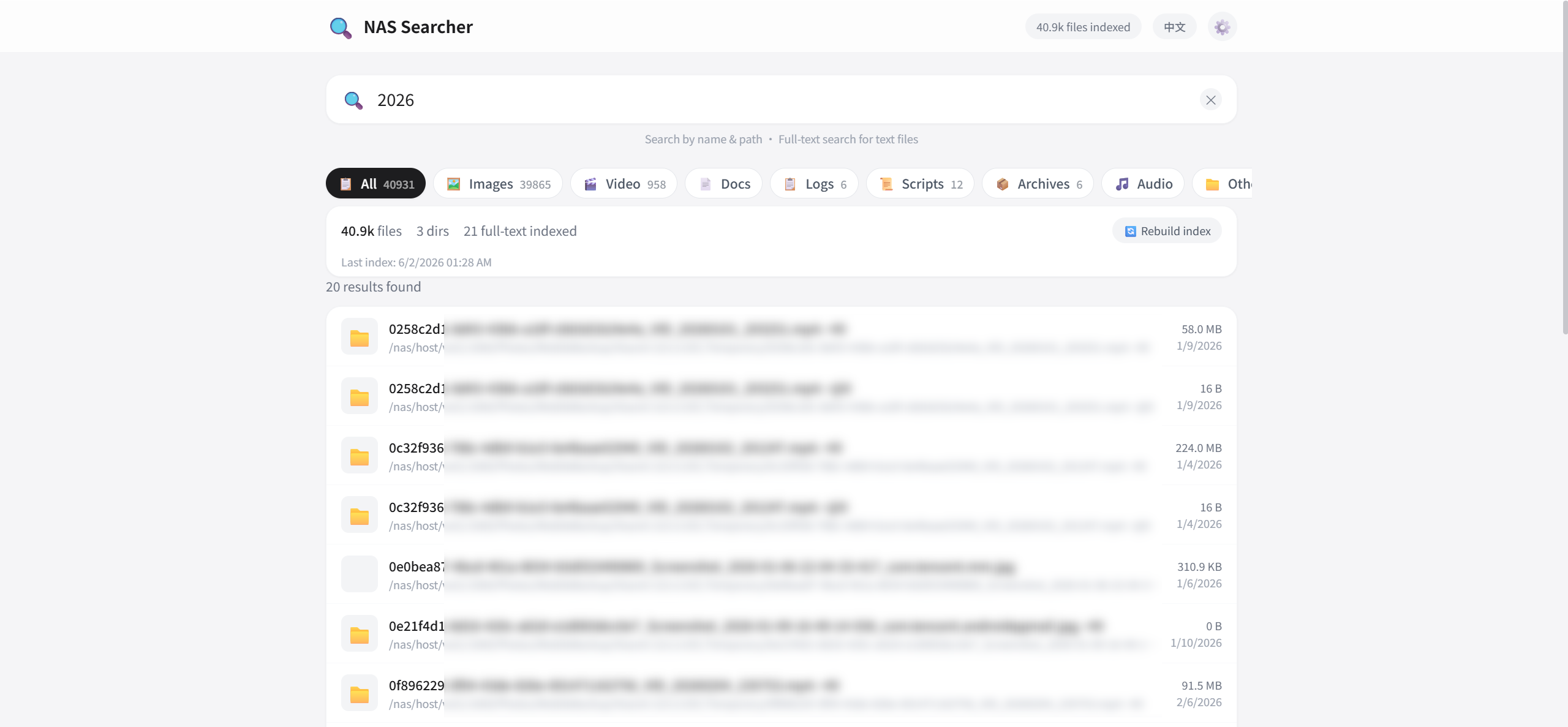
Features
🔎 File Search
- SQLite-backed fuzzy matching on file name / path, millisecond response
- Whoosh full-text content search covering 40+ text file types (code, config, docs, etc.)
- Highlighted match snippets in results, paginated loading
- LIKE wildcards escaped — searching for
%or_won't cause false matches
📁 Multi-Directory Management
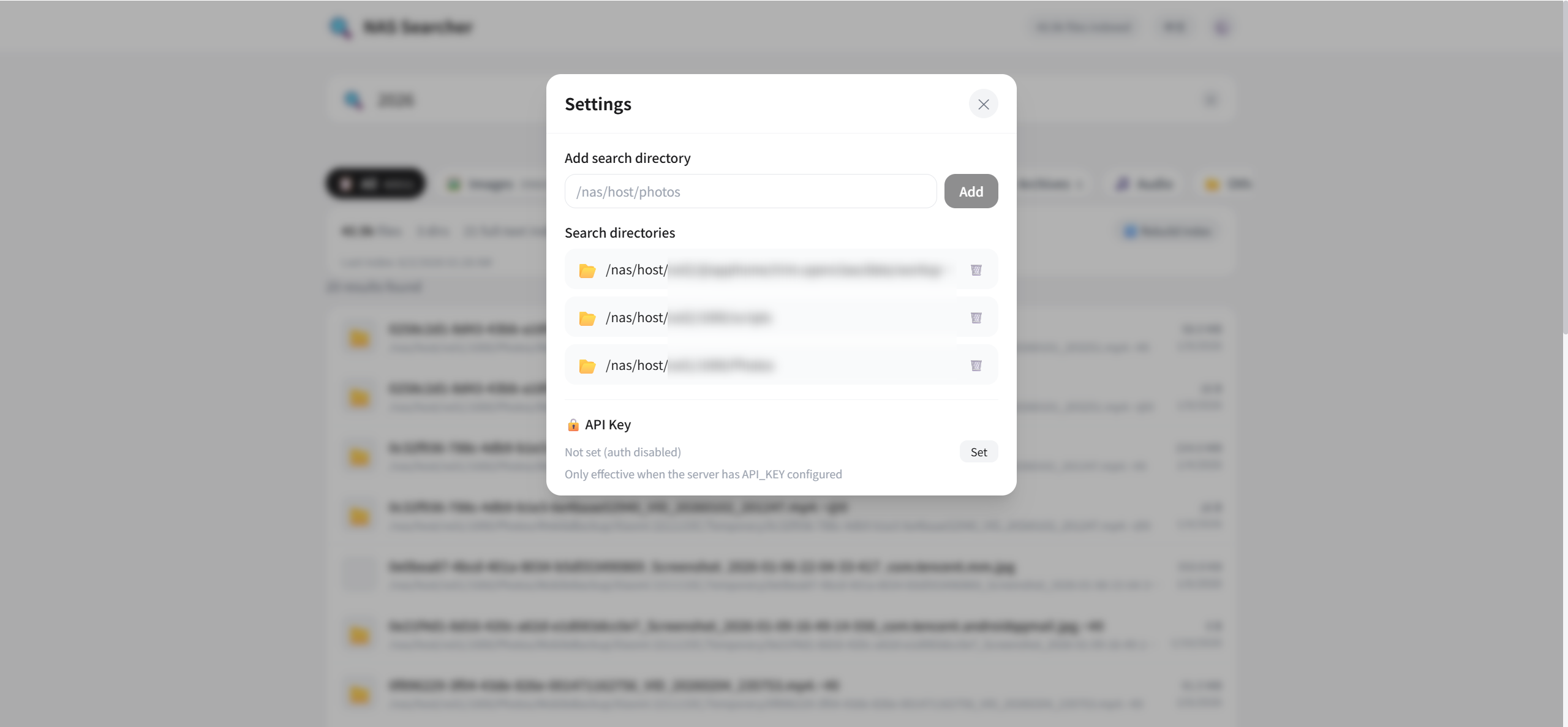
- Add / remove search directories from the web UI, with sub-directory exclusion (e.g.
.git,node_modules) - File size filtering (min / max)
- Thumbnail cache auto-cleaned when a directory is removed
🗂️ 8 File Categories
- Images / Video / Documents / Logs / Scripts / Archives / Audio / Other — one-click filter
- Auto stats on file count and space usage per category
- Filtering decoupled from the backend search contract
🖼️ Image Thumbnails
- Auto-generated and cached thumbnail previews
- Lazy-loaded on scroll into the viewport
- Decompression-bomb protection (max pixel cap), image extensions only
- Path confined to the mounted subtree — no arbitrary file read
📊 Index Progress
- Real-time rebuild progress and the file currently being processed
- Clear progress even with a huge number of files
- Background-thread indexing — search never blocked
🌐 Bilingual UI
- Auto-selects Chinese or English based on browser language
- Chinese browsers default to Chinese, others default to English
- One-click toggle in the header, choice remembered locally
🔒 Security
- Optional API Key authentication (via env var; empty = disabled)
- IP-based rate limiting against abuse and resource exhaustion
- Path-traversal protection and XSS sanitization — safe for public use
Usage
Docker Compose (recommended)
git clone https://github.com/SpringShaw/NAS-File-Search.git
cd NAS-File-Search
docker compose up -d --build
Open http://localhost:8083.
After first launch, add the host directories you want to search in Settings (e.g.
/mnt/nas/photos), then click Rebuild Index.
Local Development
# Frontend
cd frontend
npm install
npm run dev          # dev server, default port 5173

# Backend
cd backend
pip install -r requirements.txt
uvicorn app.main:app --reload --port 8083
Bare-Metal Deployment (no Docker)
To run directly on the host without Docker, use the one-shot script:
./run.sh
It builds the frontend, installs backend dependencies, and starts in bare-metal mode (NAS_HOST_PREFIX empty, using real absolute paths without the /nas/host prefix).
Manual equivalent:
# 1. Build frontend (output goes to backend/static)
cd frontend && npm install && npm run build && cd ..

# 2. Install backend deps (a virtualenv is recommended)
cd backend && pip install -r requirements.txt

# 3. Start in bare-metal mode: empty prefix, real paths
NAS_HOST_PREFIX="" DATA_DIR="$(pwd)/../data" uvicorn app.main:app --host 0.0.0.0 --port 8083
Open http://localhost:8083, then add real directories in Settings (e.g. /mnt/nas/photos — enter the real path directly in bare-metal mode, no prefix needed).
To keep the service running in the background, manage the
uvicornprocess withsystemd/nohup/supervisor.
Configuration
| Env var | Default | Description |
|---|---|---|
| HOST | 0.0.0.0 | Listen address |
| PORT | 8083 | Listen port |
| DATA_DIR | /app/data | Data directory (db, index, thumbnails) |
| API_KEY | (empty) | API Key auth; empty = disabled. Set a long random string for public deploy |
| RATE_LIMIT | 120 | Max requests per IP within RATE_WINDOW; 0 disables |
| RATE_WINDOW | 60 | Rate-limit window in seconds |
| NAS_HOST_PREFIX | /nas/host | Host path prefix. /nas/host for Docker; set empty for bare-metal to use real paths |
In Docker, the host root / is mounted read-only into the container at /nas/host. Use the original host path when adding directories in the web UI — the app converts it automatically. To narrow the attack surface, replace /:/nas/host:ro with a specific sub-directory mount.
Tech Stack
| Layer | Tech |
|---|---|
| Backend | Python 3.11 + FastAPI |
| Search | SQLite (filename) + Whoosh (full-text) |
| Frontend | Vue 3 + Vite + TailwindCSS |
| Deploy | Docker / Docker Compose |
API
| Method | Path | Description |
|---|---|---|
| GET | /api/search?q=&type=&page=&size= | Search files |
| GET | /api/stats | Index statistics |
| GET | /api/dirs | List directories |
| POST | /api/dirs | Add a search directory |
| DELETE | /api/dirs/{id} | Remove a directory |
| POST | /api/index/rebuild | Trigger index rebuild |
| GET | /api/index/status | Index progress |
| GET | /api/thumbnail?path= | Get an image thumbnail |
| GET | /api/file-types | Get file category config |
Highlights
- 🐳 One-command Docker deploy, read-only host mount, zero intrusion
- 🎨 Apple-style clean UI, responsive for desktop and mobile
- 🔒 Data stays local — indexed content never leaves your machine
- 🌐 Bilingual, auto-detects browser language
Project Structure
NAS-File-Search/
├── backend/app/         # FastAPI backend (main/config/models/indexer/search/security)
├── frontend/src/        # Vue 3 frontend (components/services/i18n)
├── docker-compose.yml   # Docker deployment
├── run.sh              # Bare-metal one-shot script
└── README.md / README.en.md