PickPic — Photo Organizer
A web-based photo sorting tool with Tinder-style card interactions for quick keep-or-delete decisions. Runs entirely offline — no network requests, no data collection. Features random photo shuffle, gesture controls (swipe right/up/double-tap/left recall), smart blacklist, MD5 dedup, thumbnail caching, video playback, full-screen viewer, recycle bin, favorites, EXIF parsing, and more.
Preview
| 📱 Mobile |
🖥️ Desktop |
 |
 |
| ↑ Click cover to play |
↑ Click cover to play |
Screenshots
| Photo |
Settings |
Settings |
Video |
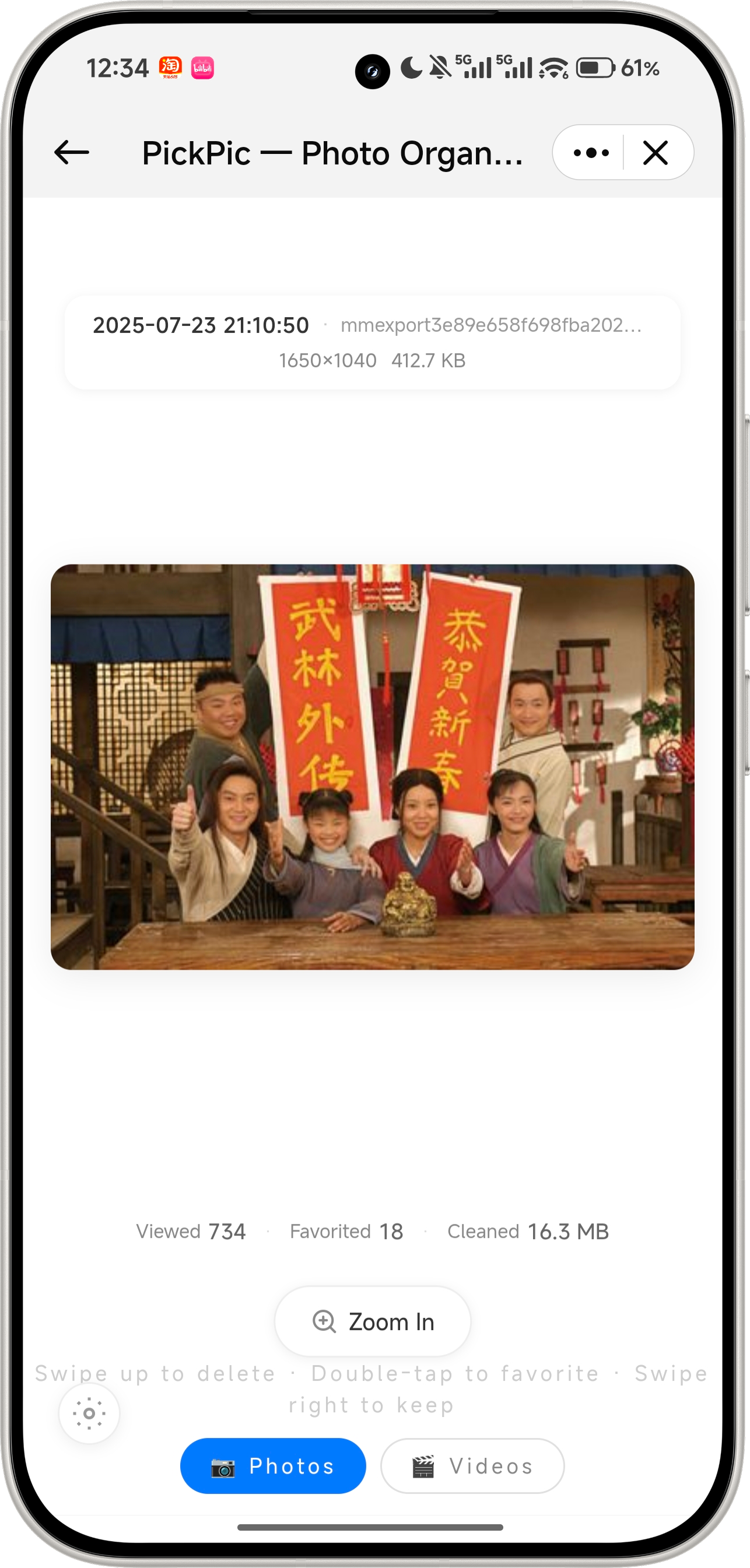 |
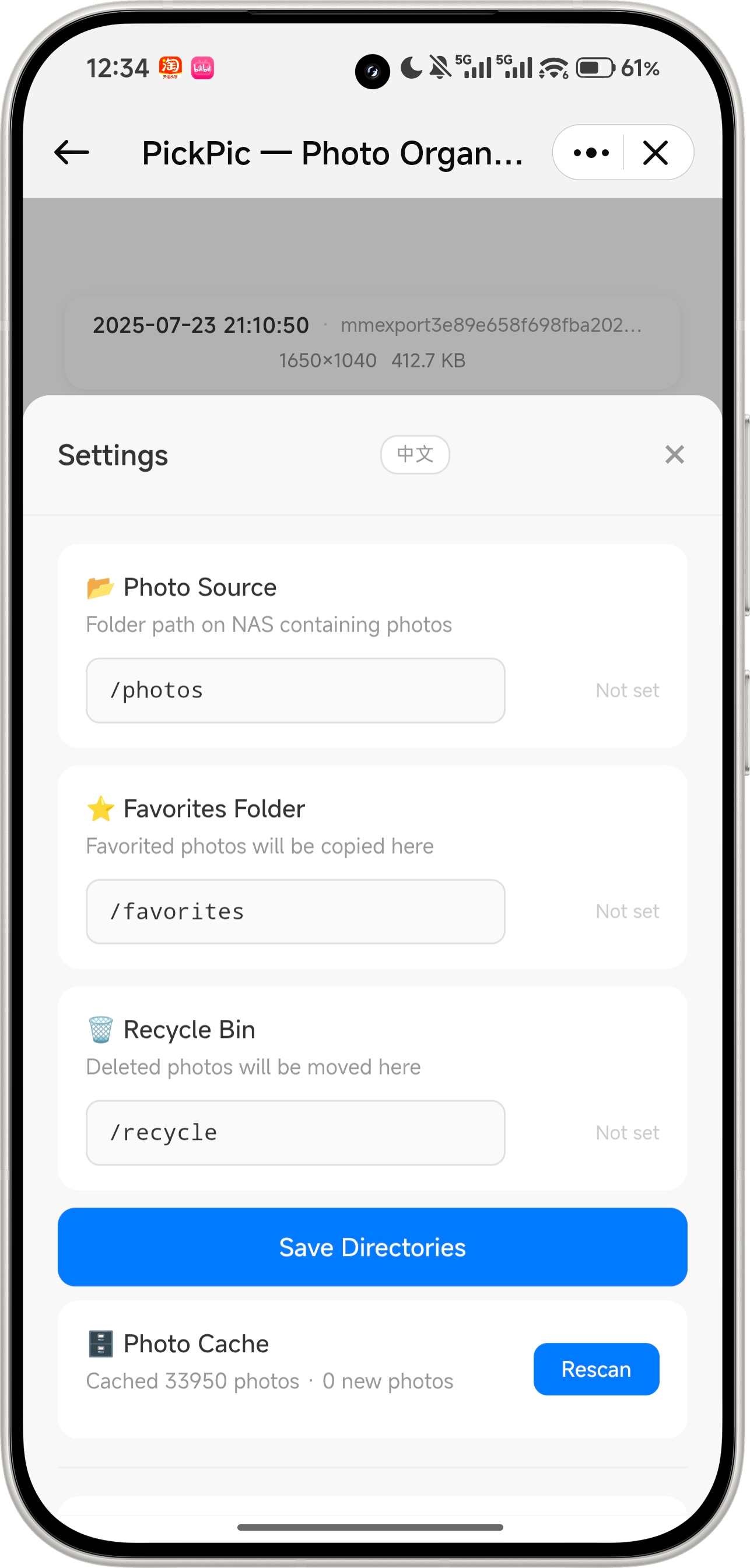 |
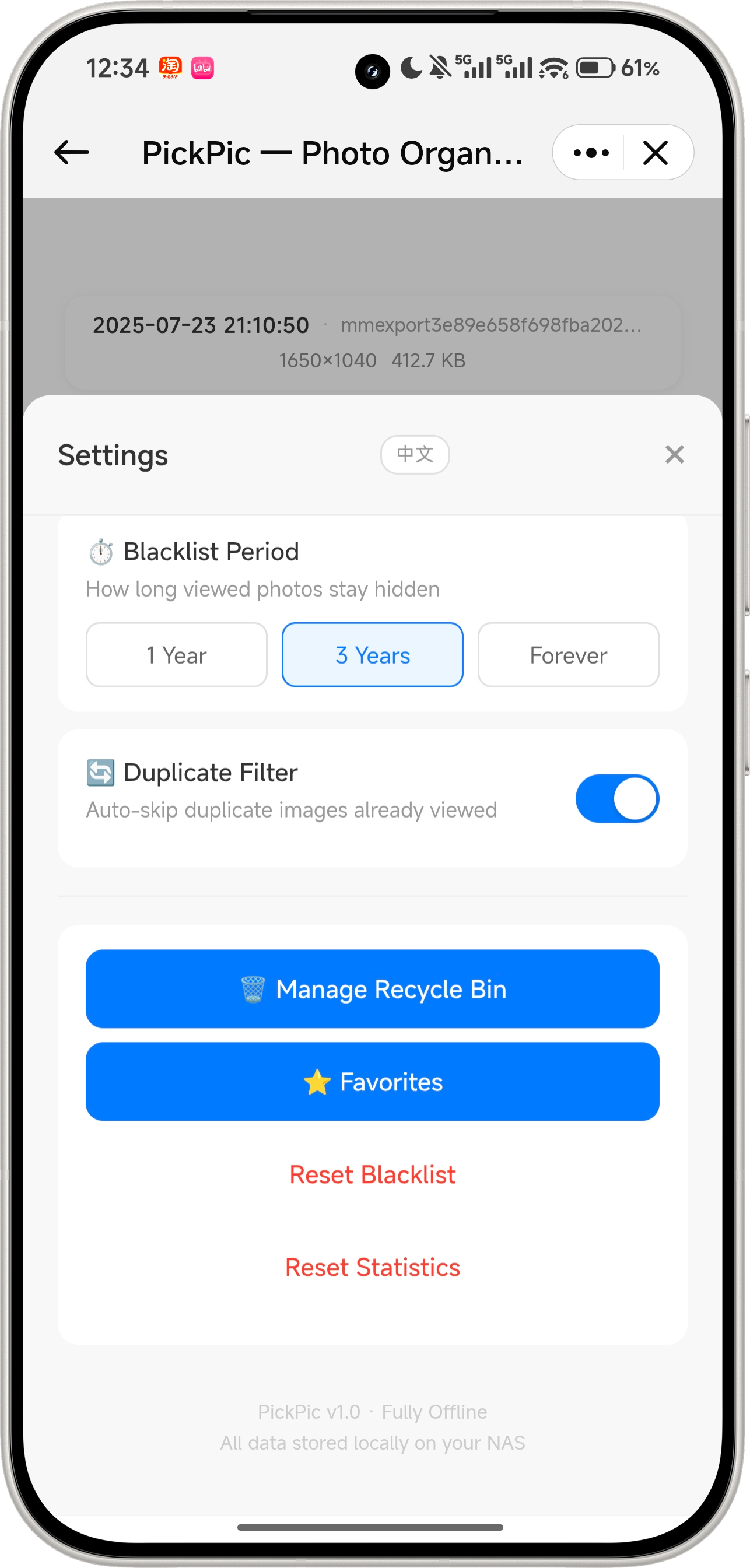 |
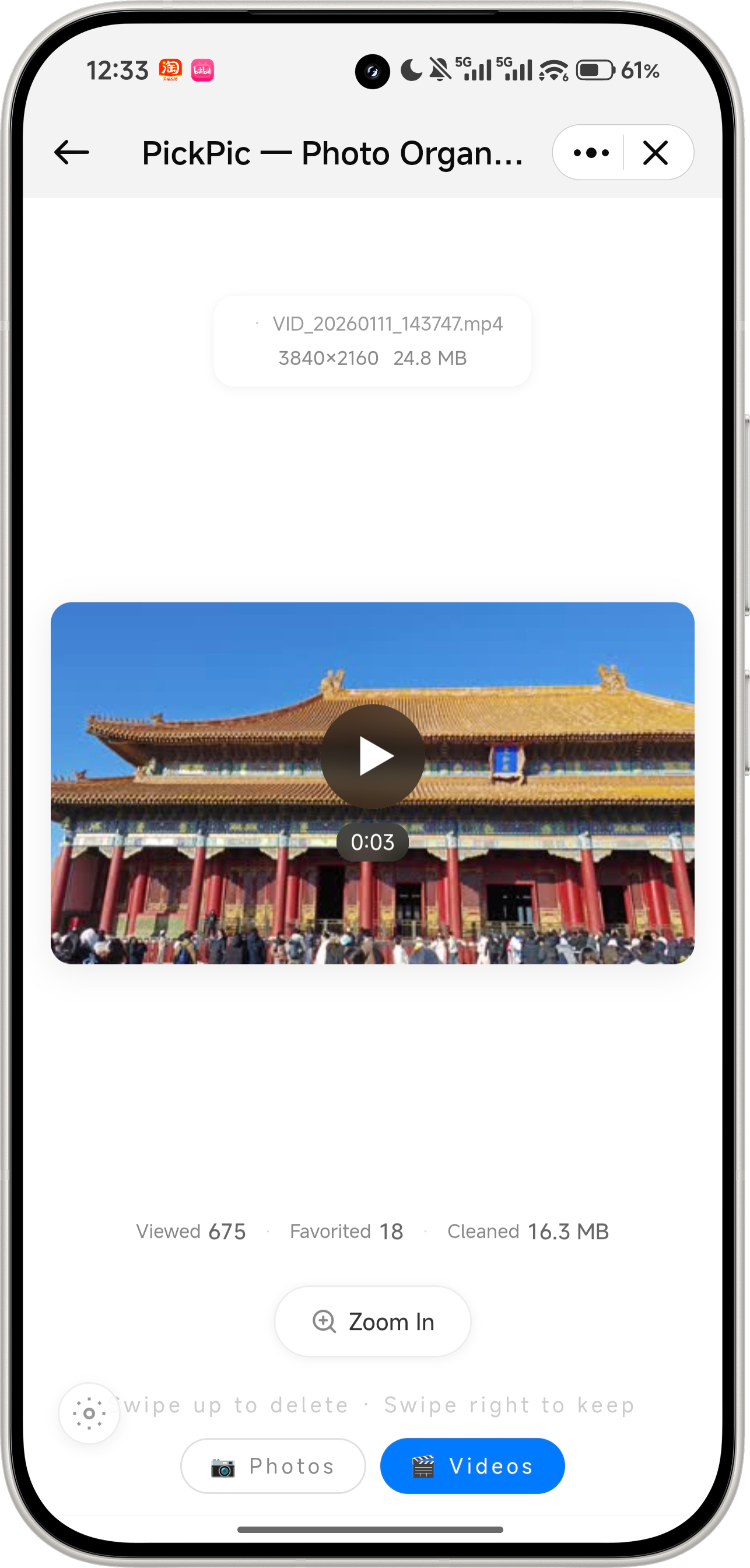 |
Features
📷 Random Shuffle
- Globally shuffles all photos — across folders, dates, and locations
- Photo / video dual-mode with independent browsing queues
- Dual-layer card architecture: current photo + preloaded next, with progressive reveal animation
✋ Gesture Controls
- Swipe right → keep the photo, move to next
- Swipe up → move to recycle bin (with confirmation)
- Double-tap → add to favorites with a heart burst animation
- Single tap → view photo details (date, location, path, resolution)
- Full mouse drag support for desktop
↩️ Left-Swipe Recall
- Bring back the last photo you swiped past
- Smooth ease-out scale animation (0.3 → 1.0)
🚫 Smart Blacklist
- Viewed photos are automatically blacklisted — won't appear again for 3 years by default
- Configurable duration: 1 year / 3 years / forever
- Background incremental scanning detects new and deleted files
🔄 Duplicate Filter
- Pre-computed MD5 hashes for content-based dedup
- Identical photos shown only once, with toggle on/off
🎬 Video Support
- 7 video formats: MP4, MOV, AVI, MKV, WebM, 3GP, FLV
- ffmpeg extracts first frame as thumbnail; ffprobe reads duration & resolution
- Built-in
<video> player with controls in full-screen viewer
🔍 Full-Screen Viewer
- Tap the "Zoom In" button to enter full-screen mode
- Pinch-to-zoom (0.5x ~ 5x), double-tap zoom in/out, drag to pan
- Mouse wheel zoom (desktop)
🗑️ Recycle Bin
- Deleted photos go to recycle bin, not permanently removed
- Single restore, batch restore, restore all
- Selective permanent delete, empty all (with confirmation)
- Auto-generates thumbnails for recycled items
⭐ Favorites
- Browse all favorited photos in one place
- Unfavorite or move to recycle bin
- Favorited files are copied to a dedicated directory
📊 Statistics
- Real-time counters: viewed, favorited, cleaned (space freed in MB)
- Reset blacklist and stats with one click
⚙️ Flexible Configuration
- Set photo source, favorites, and recycle directories via the settings panel
- Real-time directory validation (existence, writability, photo count)
- Manual full rescan trigger
🖼️ Performance
- 400×400 JPEG thumbnail cache — 10x+ faster loading
- EXIF orientation auto-correction
- 33K+ photos with sub-second random access (SQLite cache)
- Scanning runs in background without blocking browsing
🎨 iOS Minimalist Design
- Pure white background
#FFFFFF with generous whitespace
- Frosted glass:
rgba(255,255,255,0.92) + backdrop-filter: blur(12px)
- Lightweight animations: pop, slide, scale, fade
- Soft pink heart
#FFB6C1 for favorites
- Responsive layout for mobile and desktop
Project Structure
PickPic/
├── frontend/                 # Vue3 + Vite + TailwindCSS
│   └── src/
│       ├── App.vue           # Main page (dual-card architecture)
│       ├── components/       # 9 components
│       ├── i18n/             # Bilingual module (zh/en)
│       ├── styles/           # Shared CSS (modal / gridPanel)
│       ├── services/api.js   # API client (15 endpoints)
│       └── utils/            # Shared utility functions
├── backend/                  # Python3 + FastAPI + SQLite
│   └── app/
│       ├── main.py           # FastAPI entry point
│       ├── config.py         # Configuration
│       ├── models/           # Database models
│       ├── api/routes.py     # 19 REST API endpoints
│       └── services/         # Core business logic
├── README.md / README.en.md  # Bilingual docs
├── README.assets/            # Chinese screenshots
├── README.en.assets/         # English screenshots
├── Dockerfile
├── docker-compose.yml
├── deploy.sh                 # One-click deploy script
├── .env.example              # Environment template
├── .gitignore
└── LICENSE                   # MIT
Quick Start
Option 1: Docker (Recommended)
git clone https://github.com/SpringShaw/PickPic.git
cd PickPic
cp .env.example .env
# Edit .env: set PHOTOS_DIR, FAVORITES_DIR, RECYCLE_DIR
chmod +x deploy.sh
./deploy.sh
# Open http://localhost:8082
Option 2: Docker Compose
cp .env.example .env
mkdir -p data/db data/thumbnails
docker compose up -d --build
# Visit http://localhost:8082
Option 3: Bare-Metal Deployment
For Linux / macOS / Windows without Docker.
# 1. Clone the repo
git clone https://github.com/SpringShaw/PickPic.git
cd PickPic

# 2. Install backend dependencies
cd backend
pip install -r requirements.txt

# 3. Build the frontend
cd ../frontend
npm install
npm run build

# 4. Copy frontend assets to backend static dir
cp -r dist/* ../backend/static/

# 5. Create data directories
cd ../backend
mkdir -p data/db data/thumbnails

# 6. Set environment variables (optional)
export PHOTOS_DIR=/path/to/your/photos
export FAVORITES_DIR=/path/to/your/favorites
export RECYCLE_DIR=/path/to/your/recycle

# 7. Start the server
uvicorn app.main:app --host 0.0.0.0 --port 8082
For production, use systemd / supervisor / pm2 to keep the process alive.
Option 4: Local Development
Separate frontend/backend with hot reload, ideal for debugging.
# Backend (terminal 1)
cd backend
pip install -r requirements.txt
uvicorn app.main:app --host 0.0.0.0 --port 8082 --reload

# Frontend (terminal 2)
cd frontend
npm install
npm run dev
Configuration
| Variable |
Default |
Description |
PORT |
8082 |
Server port |
PHOTOS_DIR |
./photos |
Photo source directory (host path) |
FAVORITES_DIR |
./favorites |
Favorites directory |
RECYCLE_DIR |
./recycle |
Recycle bin directory |
BLACKLIST_DURATION |
3y |
Blacklist period: 1y / 3y / forever |
ENABLE_DUPLICATE_FILTER |
true |
Duplicate filter toggle |
Gesture Cheat Sheet
| Gesture |
Action |
| Swipe right |
Keep photo, next |
| Swipe up |
Delete (recycle bin) |
| Swipe left |
Recall last skipped |
| Double-tap |
Favorite |
| Single tap |
View info |
Tech Stack
| Layer |
Technology |
| Frontend |
Vue 3 + Vite + TailwindCSS |
| Backend |
Python 3 + FastAPI + SQLite |
| Container |
Docker + python:3.11-slim |
| Image Processing |
Pillow + pillow-heif (HEIC) |
| Video Processing |
ffmpeg (thumbnails + metadata) |
Supported Formats
| Type |
Formats |
| Images |
JPG, JPEG, PNG, WebP, HEIC, HEIF, BMP, GIF, TIFF |
| Videos |
MP4, MOV, AVI, MKV, WebM, 3GP, FLV |
Highlights
- 🔒 Fully offline — no network, your data stays private
- 🐳 One-click Docker deployment, up in 5 minutes
- 📱 Mobile + desktop gesture support
- ⚡ 33K+ photos with instant random access
- 🎨 iOS-inspired minimalist design
- 🆓 MIT open-source license
License
MIT License
Credits